The Speed Trap : Why Fast Hashing Fails at Password Security

Jun 05, 2026
50 min read
At PayPal, we process over 6 billion transactions annually across hundreds of millions of active accounts. Every one of those accounts is protected, in part, by a password. That makes our authentication infrastructure one of the highest-value targets in financial technology — and it makes the engineering decisions behind password storage anything but academic. As a regulated financial platform, we operate under compliance obligations (FIPS 140-2, NIST SP 800-132) that set a floor, and the engineering standards we hold ourselves to go further. The principles in this post reflect how we think about credential security at PayPal’s scale.
In June 2012, LinkedIn confirmed a breach. The initial disclosure mentioned 6.5 million password hashes posted to a Russian hacker forum. Within days, researchers had cracked the vast majority of them. By 2016, the real scope became clear: 117 million accounts. All of them hashed with unsalted SHA-1 — an algorithm optimized for speed.
That single engineering choice — selecting an algorithm built to be fast — cost LinkedIn the credential security of over a hundred million users. The technical details are worth sitting with: a modern GPU can compute roughly 30–40 billion SHA-1 hashes per second. An attacker with a list of the top one million common passwords can test all of them against every account in the database in under a second.
This post is about why speed is the enemy in password storage, what a secure password hash actually contains, and how to implement it in production systems. If you take one thing from this piece: password hashing and general-purpose hashing are solving fundamentally different problems, and conflating them is a critical security vulnerability.
1. Two Problems, Two Tools
When engineers hear 'hashing,' they typically think data structures first. Hash maps, consistent hashing in distributed systems, checksums for file integrity — all of these need hash functions that run in nanoseconds. Latency is the enemy. Throughput is the goal.
Password hashing is solving a completely different problem, and it requires a completely different model.
Assume an attacker gains read access to your database. They now have a table of hashed passwords. They cannot reverse a cryptographic hash directly — that mathematical property is why hashes are useful. But they can try to reproduce it. The attack is brute force: take a candidate password, hash it, compare to the stored hash, repeat. If there is a match, the account is compromised.
The question becomes: how many guesses can they try per second?
The answer is uncomfortable:
|
Algorithm |
GPU Throughput (approx.) |
Time to test 1M common passwords |
|
SHA-256 |
~10 billion/sec |
< 1 millisecond |
|
SHA-1 |
~30 billion/sec |
< 0.1 milliseconds |
|
MD5 |
~200 billion/sec |
Effectively instant |
|
bcrypt (cost 12) |
~100/sec per GPU |
~3 hours |
|
Argon2id (tuned) |
~5–20/sec per GPU |
Days to weeks |
The goal of a password hashing algorithm is to make each computation take 100–300 milliseconds on modern hardware. That delay is imperceptible to a user logging in once. For an attacker running an offline brute-force against millions of candidate passwords, it turns what would be a weekend project into something that takes years.
There is a second important property: the work factor must be tunable, and it must stay expensive as hardware improves. Every two years, compute roughly doubles. A bcrypt work factor calibrated in 2015 is significantly cheaper to crack today. The right algorithms let you increment the difficulty parameter — and the hash string itself records what parameters were used, so older hashes remain verifiable.
2. The Three Pillars of Secure Password Hashing
2.1 Salt — Defense Against Rainbow Tables
Before we get to work factors, there is a simpler attack to neutralize: pre-computation.
A rainbow table is a massive pre-computed lookup table mapping common passwords to their hashes. If you hash 'password123' using SHA-256, the result is a deterministic fixed string. An attacker with a rainbow table containing that entry does not need to compute anything — they look it up. The attack is essentially a dictionary lookup, not brute force.
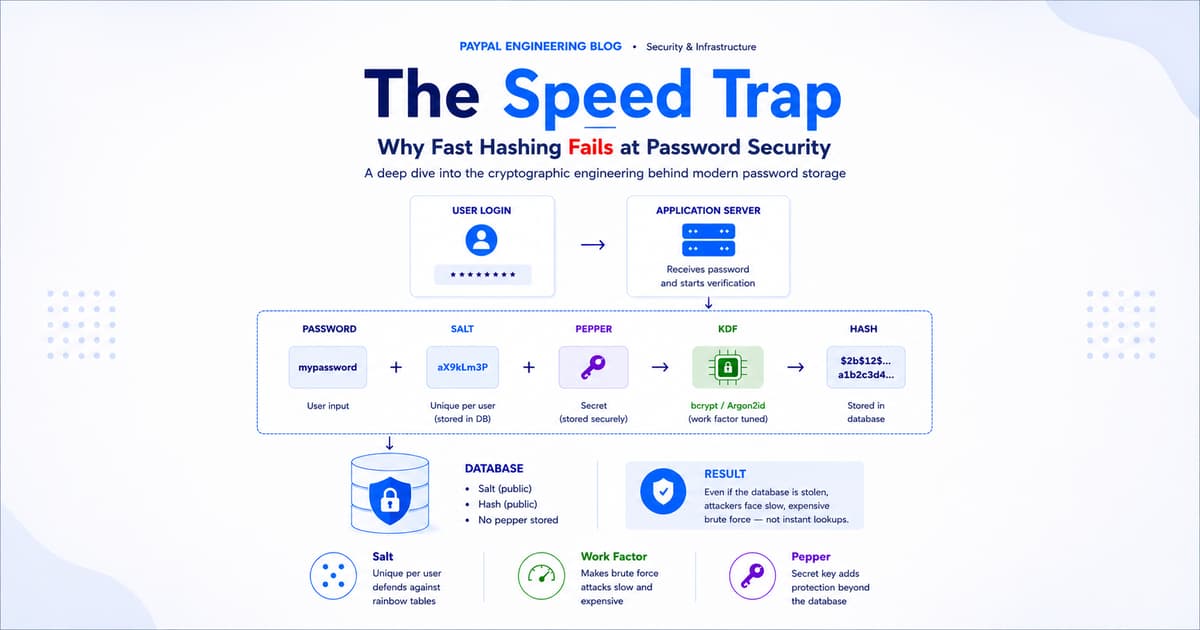
The defense is a salt: a randomly generated string appended to each password before hashing.
Concept
# Two users, same password — completely different hashes
User A: password = 'password123' + salt = 'aX9kLm3P'
hash = KDF('password123aX9kLm3P')
User B: password = 'password123' + salt = 'Zp7nQr1T'
hash = KDF('password123Zp7nQr1T')
# Same input, completely different stored values.
The salt is not secret — it is stored in plain text alongside the hash in your database. Its purpose is not secrecy; it is uniqueness. An attacker who steals your database cannot use a pre-computed rainbow table because they would need to recompute the entire table for each unique salt value. It transforms a lookup into brute force, and brute force is expensive.
2.2 Work Factor — Defense Against Brute Force
The work factor — also called cost factor or iteration count — is the defining characteristic of password hashing algorithms. It is a parameter you set at deployment time that controls how much computational work goes into a single hash.
In bcrypt, setting a work factor of 12 causes the algorithm to run 2¹² = 4,096 internal rounds. Setting it to 13 doubles that to 8,192. Each increment of 1 doubles the computation time. The relationship is deliberate: you can tune the hash to take exactly as long as you want on your target hardware.
The operational math is straightforward. If a hash takes 200ms to compute, one server thread handles roughly five login verifications per second. For a legitimate user logging in once, the delay is invisible. For an attacker trying ten million password candidates offline, the delay stacks to 23 days of single-core CPU time.
The work factor is encoded in the hash string itself, which means verification code always knows what parameters were used. This is what enables the upgrade path: when you increase the work factor, existing users' hashes remain verifiable with the old factor until they log in and get rehashed with the new one.
2.3 Pepper — Defense Against Database-Only Breaches
A salt is stored in the database, next to the hash. A pepper is not.
A pepper is a secret application-level key — typically stored in environment variables, a secrets management service (like HashiCorp Vault or AWS Secrets Manager), or a Hardware Security Module. It is mixed into the password before hashing, but because it lives outside the database, stealing the database alone is not enough to mount a cracking attack.
A common implementation pattern: HMAC the password with the pepper key before passing it to the password hashing function.
Python — applying a pepper via HMAC
import hmac, hashlib
PEPPER = os.environ['PASSWORD_PEPPER'] # Secret, stored outside DB
def prepare_password(raw_password: str) -> bytes:
# HMAC normalises length and applies the pepper
return hmac.new(
PEPPER.encode(),
raw_password.encode(),
hashlib.sha256
).digest()
# Then pass the result into Argon2 / bcrypt as the 'password' input
One operational consideration: rotating a pepper requires rehashing every password that used the old key. Design your pepper rotation strategy — whether mass migration or lazy rehash on login — before you implement it. Operationally, pepper rotation is the most common argument against using one, but the security benefit is significant enough that it's worth the planning overhead.
3. What Not to Use, and Why
The following algorithms are perfectly valid for many cryptographic uses. They are wrong for passwords — not because they are cryptographically broken, but because they are too fast. That is not a coincidence; they were explicitly designed for speed.
MD5
Produces a 128-bit hash. A modern GPU can compute roughly 200 billion MD5 hashes per second. An attacker testing the top one billion commonly-used password candidates exhausts the list in five seconds. MD5 was designed for checksums and data integrity verification. If you encounter it in a production password context, treat it as a critical, active vulnerability requiring immediate remediation.
SHA-1
Slightly slower — a GPU manages 30–40 billion hashes per second. Still orders of magnitude too fast. SHA-1 is what LinkedIn was using in 2012. The breach documented exactly what happens when it leaks.
SHA-256 and SHA-3
This surprises many engineers. SHA-256 is a gold standard for signing, certificate verification, and data integrity. It's entirely appropriate in those contexts. For passwords, even at 'only' 10 billion hashes per second on a GPU, it is completely unsuitable. It was optimized for throughput. That optimization is precisely what makes it dangerous here.
Core insight: The unifying problem: all three were designed to be fast. Their speed is a feature in every context except password storage, where it becomes a liability.
4. The Right Algorithms — Key Derivation Functions
These algorithms are called Key Derivation Functions (KDFs). Their defining characteristic is intentional computational expense. They are slow by design, and that slowness is configurable.
4.1 Argon2 — The Current Gold Standard
Argon2 won the Password Hashing Competition in 2015, a multi-year open cryptographic competition with extensive academic scrutiny. For new applications, it is the recommended starting point.
Argon2 comes in three variants:
• Argon2i — Uses a data-independent memory access pattern. Designed for resistance to side-channel attacks. Best for password hashing in high-security environments.
• Argon2d — Uses a data-dependent memory access pattern. Maximises resistance to GPU and ASIC cracking attacks. Preferred for cryptocurrency key derivation.
• Argon2id — A hybrid of the two. Provides side-channel resistance on the first pass and GPU-cracking resistance on subsequent passes. The recommended choice for most applications.
Argon2 exposes three tuning parameters, each addressing a different attack
surface:
• Time cost (t) — number of iterations over memory. Higher = more CPU time per hash.
• Memory cost (m) — RAM consumed in kilobytes per hash operation.
• Parallelism (p) — number of parallel threads. Should match your server's available CPU cores.
The memory parameter is what makes Argon2 particularly resistant to GPU-based
attacks. A GPU has thousands of cores, but limited per-core memory. If each
hash attempt requires 64MB of RAM, most GPU cores cannot operate simultaneously
— the attack parallelism collapses.
Tuning guidance: Recommended starting point: t=3, m=65536 (64MB), p=4. Benchmark on your target hardware and tune until the hash time falls in the 200–500ms range.
4.2 bcrypt — Decades of Proven Reliability
bcrypt has been the industry workhorse since 1999. Over 25 years of cryptanalysis have found no practical weaknesses. If Argon2 feels too new for your organisation's risk tolerance, or your tech stack doesn't have a well-maintained Argon2 library, bcrypt is a well-accepted fallback.
One known limitation: bcrypt silently truncates input at 72 bytes. A 200-character passphrase and a 73-character version of it produce identical hashes. The practical workaround is straightforward — SHA-256 hash the password before passing it to bcrypt, normalising the input to 32 bytes.
Python — SHA-256 pre-hashing for bcrypt
# Workaround for the 72-byte truncation
import hashlib, bcrypt, base64
def prepare_for_bcrypt(password: str) -> bytes:
digest = hashlib.sha256(password.encode()).digest()
return base64.b64encode(digest) # base64 keeps output in safe ASCII range
hashed = bcrypt.hashpw(prepare_for_bcrypt(raw_password), bcrypt.gensalt(rounds=12))
Tuning guidance: Recommended work factor: 12. On 2024-era hardware this yields ~200–300ms per hash. Increment when hardware benchmarks show you falling below 100ms.
4.3 scrypt — Hardware-Attack Resistant
scrypt was designed explicitly to resist attacks from custom hardware (ASICs and FPGAs). It is heavily memory-intensive — significantly more so than bcrypt — making it economically infeasible to build specialised cracking hardware for it.
Three parameters: N (CPU/memory cost factor), r (block size), p (parallelism). scrypt sees significant use in cryptocurrency wallets (Litecoin uses it natively) and applications where the threat model includes well-funded adversaries with custom silicon. For general web applications, Argon2id is typically preferred due to its cleaner parameterisation.
4.4 PBKDF2 — The Enterprise and Government Standard
PBKDF2 applies a pseudorandom function — commonly HMAC-SHA-256 — thousands of times to a password. It is the only algorithm on this list that is FIPS 140-2 certified, which makes it a practical requirement for government and regulated financial environments.
Its weakness relative to Argon2 is that it lacks memory-hardness. A GPU cluster can throw raw compute at it more effectively than it can at Argon2 or scrypt. For environments where FIPS compliance is mandated, PBKDF2 is the right choice. For greenfield applications without that constraint, Argon2id is the stronger option.
Compliance note: NIST SP 800-132 (2023 revision) recommends a minimum of 600,000 iterations for PBKDF2-SHA-256. If your current configuration is lower, it needs to be updated.
5. What a Stored Hash Actually Looks Like
When you inspect a password hash in a production database, it might look like noise. It is not. Modern KDFs store everything the system needs to verify a password in a single structured string. Understanding the format matters — it is what enables backward-compatible work factor upgrades and algorithm migrations.
bcrypt hash format
bcrypt — annotated hash string
$2b$12$R9h/cIPz0gi.URQH98shzO.dKLsMH9gE2M1kNzpAbqXF5Y7wLM8hi
$2b → Algorithm identifier (bcrypt version 2b)
$12 → Work factor (2^12 = 4,096 rounds)
R9h/cIPz0gi.URQH98shzO → First 22 chars: base64-encoded 128-bit salt
.dKLsMH9gE2M1kNzpAbqXF5Y7wLM8hi → Remaining chars: the actual hash
Argon2id hash format
Argon2id — annotated hash string
$argon2id$v=19$m=65536,t=3,p=4$c29tZXJhbmRvbXNhbHQ$RdescudvJCsgt3ub+b+dWRWJTmaaJObG
$argon2id → Algorithm variant
$v=19 → Version number
$m=65536,t=3,p=4 → Memory (64MB), time cost (3 rounds), parallelism (4)
$c29tZXJhbmRvbXNhbHQ → Base64-encoded salt
$RdescudvJCsgt3ub... → Base64-encoded hash output
This self-describing format is intentional. If you increase the work factor next year, existing hashes remain verifiable — the verification code reads the parameters from the hash string itself. New logins get rehashed with the updated parameters. Old hashes are not invalidated.
6. The Verification Workflow
One of the underappreciated properties of password hashing is that verification does not require reversing the hash — which would be impossible. It requires reproducing it from the same inputs.
Registration
Flow
1. User submits plaintext password
2. System generates a cryptographically random salt (16+ bytes)
3. System computes: stored_hash = KDF(password, salt, work_factor)
4. System stores: stored_hash string in database
(The hash string embeds the salt and work_factor — no need to store them separately)
5. Plaintext password is discarded — never stored, never logged
Login
Flow
1. User submits plaintext password
2. System retrieves stored_hash from database
3. System parses stored_hash to extract: algorithm, salt, work_factor
4. System computes: candidate_hash = KDF(submitted_password, salt, work_factor)
5. System compares: candidate_hash == stored_hash (constant-time comparison)
6. Match → authentication succeeds
No match → reject without timing information
Step 5 — constant-time comparison — deserves extra attention. Standard string comparison in most languages short-circuits: it returns as soon as it finds the first differing character. This leaks timing information. An attacker who can measure authentication response times can use the variance to learn how many characters of a guessed hash match the stored hash — a side-channel attack.
Always use your language's constant-time comparison primitive:
Constant-time comparison — language references
Python: hmac.compare_digest(hash_a, hash_b)
Go: subtle.ConstantTimeCompare(a, b)
Java: MessageDigest.isEqual(a, b)
Node.js: crypto.timingSafeEqual(Buffer.from(a), Buffer.from(b))
Note that well-maintained password libraries (argon2-cffi, passlib, bcrypt) handle this internally. If you are using a trusted library's verify function, you do not need to implement this manually.
7. Production Implementation
7.1 Complete Python Example — Argon2id
Python — argon2-cffi
from argon2 import PasswordHasher
from argon2.exceptions import VerifyMismatchError, InvalidHashError
ph = PasswordHasher(
time_cost=3, # Iterations
memory_cost=65536, # 64 MB
parallelism=4, # Match your CPU core count
hash_len=32,
salt_len=16
)
# Registration
def hash_password(password: str) -> str:
return ph.hash(password)
# Login
def verify_password(stored_hash: str, submitted: str) -> bool:
try:
return ph.verify(stored_hash, submitted)
except (VerifyMismatchError, InvalidHashError):
return False
# Call this on successful login — rehash if parameters are outdated
def needs_rehash(stored_hash: str) -> bool:
return ph.check_needs_rehash(stored_hash)
7.2 Complete Node.js Example — bcrypt
Node.js — bcrypt
const bcrypt = require('bcrypt');
const SALT_ROUNDS = 12;
// Registration
async function hashPassword(password) {
return bcrypt.hash(password, SALT_ROUNDS);
// bcrypt.hash generates a fresh random salt internally on every call
}
// Login
async function verifyPassword(submitted, storedHash) {
return bcrypt.compare(submitted, storedHash);
// bcrypt.compare uses constant-time comparison internally
}
Critical: Never construct salts manually. Never call the raw hash function and concatenate parts yourself. Use the library's high-level hash() and verify() functions — they handle salt generation, encoding, and constant-time comparison correctly.
8. Engineering Considerations at Scale
Upgrading Work Factors Without a Mass Migration
Hardware improves. A bcrypt cost factor of 10, which was appropriate in 2012, is computationally much cheaper today. The problem is you cannot rehash a stored password without knowing the original plaintext — and you never have that.
The standard solution is rehash-on-login: when a user successfully authenticates, check whether their stored hash was computed with the current recommended parameters. If not, you have the plaintext password in memory at that moment. Hash it with the updated parameters and overwrite the stored hash.
Python — rehash-on-login pattern
# On successful login:
if verify_password(stored_hash, submitted_password):
if needs_rehash(stored_hash):
new_hash = hash_password(submitted_password) # uses current parameters
db.update_password_hash(user_id, new_hash)
# Proceed with authenticated session
Active users migrate automatically over days or weeks. Inactive accounts remain with older parameters — which is acceptable, since accounts that never log in present a lower active attack surface.
Performance Planning
At 200ms per hash, a single synchronous server thread handles roughly five login verifications per second. For high-traffic authentication services, this has real infrastructure implications.
• Set Argon2's parallelism parameter to match available CPU cores per instance.
• Run authentication on dedicated compute, separate from your API tier.
• Use async execution so hash computation does not block the event loop in Node.js or Python async services.
• Size horizontally: authentication is stateless and scales linearly with additional instances.
This is not an argument to lower the work factor. It is an argument for
capacity planning authentication infrastructure correctly. The cost of running
more instances is far lower than the cost of a credential breach.
Defense in Depth
Password hashing is one layer of authentication security. It should be combined with:
• Rate limiting on login endpoints — even bcrypt at 300ms provides limited protection if an attacker sends 1,000 concurrent requests. Limit failed attempts per IP and per account.
• Multi-factor authentication — strong hashing is irrelevant if the user can be phished directly for their plaintext credential.
• Credential breach monitoring — check submitted passwords against known-leaked credential databases (HaveIBeenPwned API) at registration and login. Users reuse passwords across services.
• Audit logging — log authentication failures with enough context to detect brute-force patterns. Alert on anomalous volumes.
• Account lockout with exponential backoff — not a hard lockout (that enables denial-of-service), but a progressively increasing delay on failed attempts.
Closing Thoughts
The LinkedIn breach is a useful bookmark. 117 million users paid the price for an engineering shortcut made years earlier — choosing an algorithm that optimised for the wrong property. Speed felt like a virtue. In this context, it was the vulnerability.
Password hashing is one of the few areas in software engineering where the wrong instinct — faster is better — actively harms the people using your system. The counterintuitive design is the correct one: deliberate slowness, memory intensity, and tunable difficulty that stays expensive as hardware improves.
The practical checklist is short:
• Use Argon2id for new applications. bcrypt is a well-tested fallback.
• Never use MD5, SHA-1, or SHA-256 for passwords. They are too fast.
• Let your library generate salts — never construct them manually.
• Store only the hash string. No plaintext. No intermediate values. Nothing else.
• Implement rehash-on-login so work factor upgrades happen transparently over time.
• Use constant-time comparison for hash verification — or use a library that does it for you.
• Pair with rate limiting, MFA, and breach detection. Hashing alone is not a complete solution.
Cryptography is the one area of engineering where 'I'll just implement it
myself' is almost always a security hole waiting to be discovered. Use
argon2-cffi, passlib, or bcrypt. Read the documentation. Tune the parameters
for your hardware. And revisit the work factor on a schedule — what was
expensive two years ago may not be today.
The slow path, it turns out, is the safe one.
At PayPal, operating at financial-platform scale means authentication infrastructure is a discipline of its own — not an afterthought. Our compliance obligations set a floor, but the engineering bar we hold ourselves to goes further. The right algorithm, tuned correctly, paired with rate limiting, MFA, and breach monitoring, is what it takes to protect accounts that people trust with their financial lives. If you’re building on PayPal’s developer platform, the same principles apply to how you store credentials in your own systems. Secure authentication is not a feature — it’s the foundation.
Recommended

Developer Day for Fastlane by PayPal: A Masterclass of Innovation

5 min read
Pay by Bank for E-Commerce | Using Bank Accounts to Make Purchases with SMBs [SEPA]
5 min read
PayPal Dev Days 2025: Building Smarter Commerce
5 min read